FAQ
How is Timefold Solver Licensed?
Timefold Solver is open source software, released under the Apache License 2.0. This license is very liberal and allows reuse for commercial purposes. Read the layman’s explanation.
Timefold Solver Plus and Enterprise editions are commercial products that offer additional features to scale out to very large datasets. To find out more, see Plus / Enterprise Edition section of this documentation.
Does Timefold offer pre-built models?
Timefold offers a suite of pre-built PlanningAI models designed to expedite development by addressing complex scheduling and routing challenges across various industries. These models are built upon Timefold Solver Enterprise Edition technology and are accessible through a REST API, facilitating seamless integration into your applications.
See all available models on our platform.
Which versions of Java, Quarkus, and Spring Boot are supported?
Timefold Solver integrates with Quarkus and Spring Boot out of the box. Get started quickly with the Quarkus quick start or the Spring Boot quick start.
The following table lists the supported versions of Java, Quarkus, and Spring Boot for each Timefold Solver major version:
| Timefold Solver | Java Baseline | Quarkus | Spring Boot |
|---|---|---|---|
1.x |
17 |
3.x |
3.x |
2.x |
21 |
3.x |
4.x |
Will Timefold Solver replace our human planners?
A good Timefold Solver implementation beats any good human planner for non-trivial datasets. Many human planners fail to accept this, often because they feel threatened by an automated system.
But despite that, both can benefit if the human planner becomes the supervisor of Timefold Solver:
-
The human planner defines, validates, and tweaks the score function.
-
The human planner tweaks the constraint weights of the constraint configuration in a UI, as the business priorities change over time.
-
When the business changes, the score function often needs to change too. The human planner can notify the developers to add, change or remove score constraints.
-
-
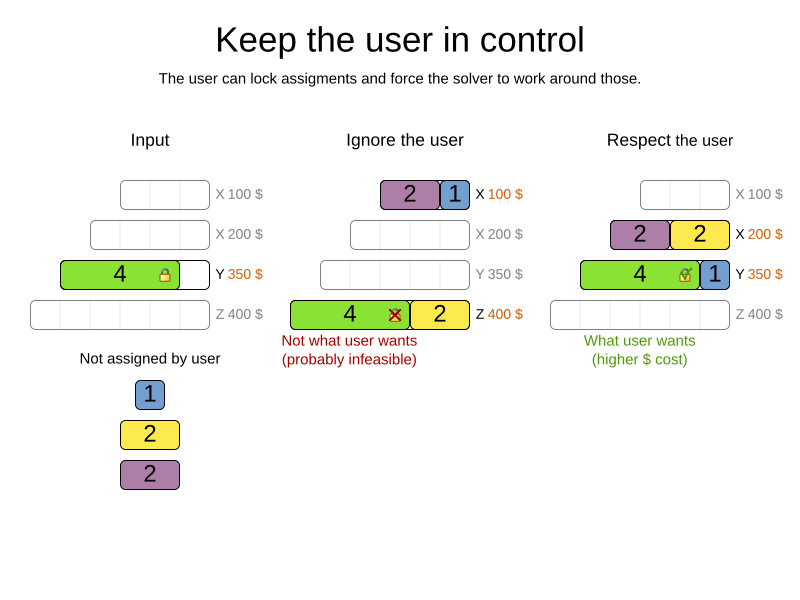
The human planner is always in control of Timefold Solver.
-
The human planner can pin down one or more planning variables to a specific planning value. Because they are pinned, Timefold Solver does not change them: it optimizes the planning around the enforcements made by the human. If the human planner pins down all planning variables, he/she sidelines Timefold Solver completely.
-
In a prototype implementation, the human planner occasionally uses pinning to intervene, but as the implementation matures, this should become obsolete. The feature should be kept available as a reassurance for the humans, and in the event that the business changes dramatically before the score constraints are adjusted accordingly.
-
For this reason, it is recommended that the human planner is actively involved in your project.
Can Timefold Solver be included in a (GraalVM) native application?
Yes. Timefold Solver has been tested with Quarkus and Spring Boot plugins to create native executables. Native executables typically have a fast startup time and reduced memory consumption. However, given the nature of the workloads running with the solver, these benefits are often overshadowed by slower solving speeds due to lack of JIT optimizations.
Read more about this in our blog post.